Example
Create a simple machine
ts
import { createMachine, assign, createActor } from 'xstate';

const countMachine = createMachine({
  context: {
    count: 0,
  },
  on: {
    INC: {
      actions: assign({
        count: ({ context }) => context.count + 1,
      }),
    },
    DEC: {
      actions: assign({
        count: ({ context }) => context.count - 1,
      }),
    },
    SET: {
      actions: assign({
        count: ({ event }) => event.value,
      }),
    },
  },
});

const countActor = createActor(countMachine).start();

countActor.subscribe((state) => {
  console.log(state.context.count);
});

countActor.send({ type: 'INC' });
// logs 1
countActor.send({ type: 'DEC' });
// logs 0
countActor.send({ type: 'SET', value: 10 });
// logs 10
event
- INC(Increase):增加
- DEC(Decrease):减少
- SET:自定义值
context
定义初始数据 count
createActor
createActor 是什么?就像class → instance
ts
const countActor = createActor(countMachine).start()Machine 是“设计图”
Actor 是“运行中的实例”
subscribe
每次状态 / context 变化都会触发
ts
countActor.subscribe(state => {
  console.log(state.context.count)
})
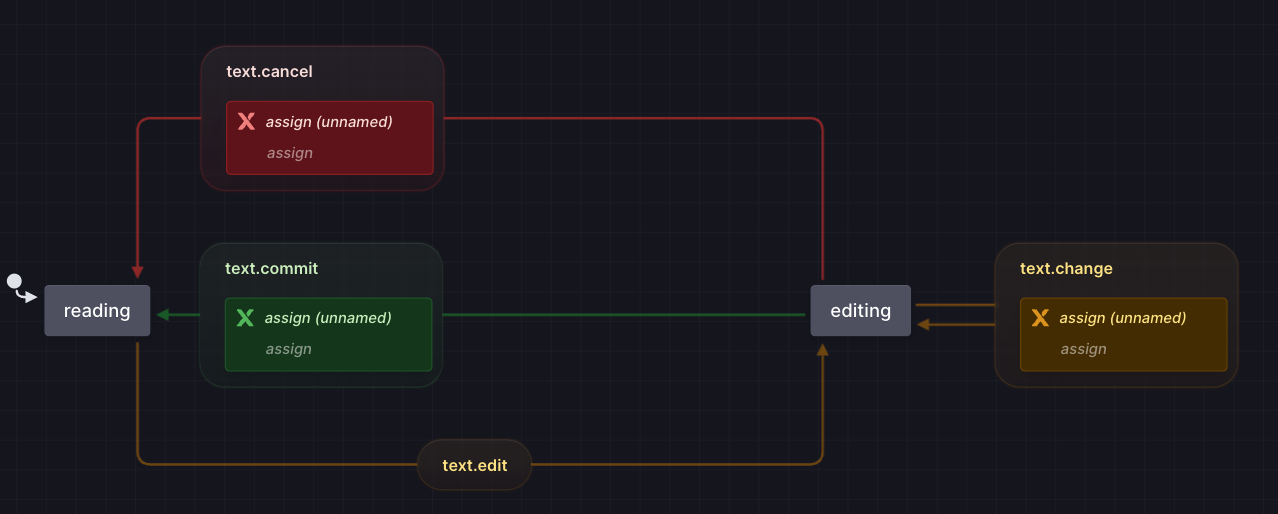
Create a more complex machine
ts
import { createMachine, assign, createActor } from 'xstate';

const textMachine = createMachine({
  context: {
    committedValue: '',
    value: '',
  },
  initial: 'reading',
  states: {
    reading: {
      on: {
        'text.edit': { target: 'editing' },
      },
    },
    editing: {
      on: {
        'text.change': {
          actions: assign({
            value: ({ event }) => event.value,
          }),
        },
        'text.commit': {
          actions: assign({
            committedValue: ({ context }) => context.value,
          }),
          target: 'reading',
        },
        'text.cancel': {
          actions: assign({
            value: ({ context }) => context.committedValue,
          }),
          target: 'reading',
        },
      },
    },
  },
});

const textActor = createActor(textMachine).start();

textActor.subscribe((state) => {
  console.log(state.context.value);
});

textActor.send({ type: 'text.edit' });
// logs ''
textActor.send({ type: 'text.change', value: 'Hello' });
// logs 'Hello'
textActor.send({ type: 'text.commit' });
// logs 'Hello'
textActor.send({ type: 'text.edit' });
// logs 'Hello'
textActor.send({ type: 'text.change', value: 'Hello world' });
// logs 'Hello world'
textActor.send({ type: 'text.cancel' });
// logs 'Hello'